Example draft awaiting approval
- TO
- ROLE
- RE
from the job posting
from your profile
ReachAI finds the recruiters and hiring managers at companies hiring for your roles, writes each of them a short note using only your real experience and a real job posting, and puts it on your desk. Nothing leaves until you sign off.
Try it — this is what lands in your inbox. Sample people, not real ones.
Not a spam cannon. Not a LinkedIn bot. Not a hosted service. A careful assistant that drafts, then waits.
Everything before approval is automated and checked. The decision about what goes out under your name is always yours.
Apollo searches for the people you'd actually write to — recruiters, engineering managers, founders — at companies with recent postings for your target roles.
Only people with a verified work email whose company has a live, matching posting are kept. Everyone else is skipped, with a reason.
A short note built from your profile and that posting. Claude Code writes it with every tool switched off, then it's checked for the company, the role and your resume link.
One email per person: who they are, their LinkedIn, the posting, the exact message. Tap approve, tap reject, or just reply APPROVE.
That single letter goes out from your own Gmail, inside your daily limit, and lands in an audit log you can read any time.
Every message needs an explicit approval, and approving one never approves another.
Drafts may only use your profile and a stored job posting. People are never invented.
Approvals by email are read from the first line you typed, from your own address. Quoted text can't approve anything.
The daily cap, duplicate checks and your do-not-contact list are enforced right as a message is sent.
Drafting runs with every tool disabled, so outside data can shape words but never trigger anything.
Local database, your own keys, and a dry-run mode until you decide to go live.
Review drafts, see who's been contacted, and read the full history. It runs on your computer and nowhere else.
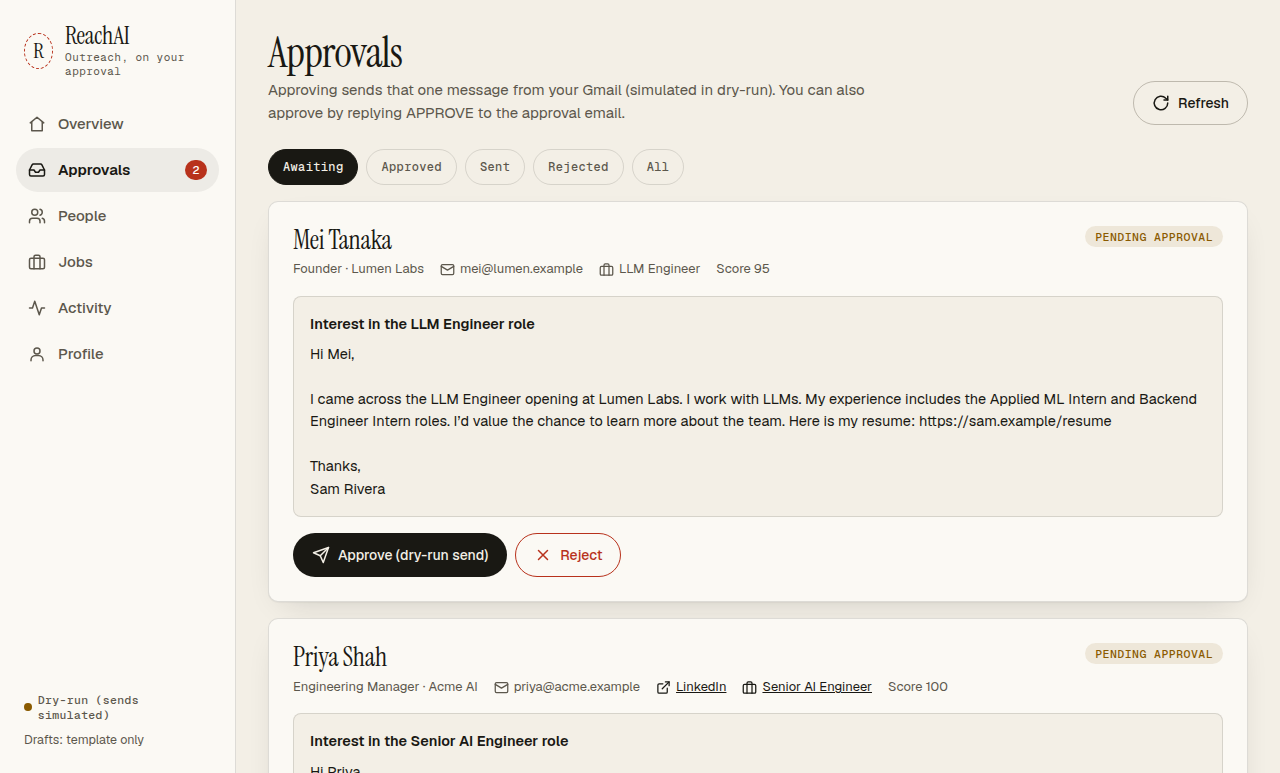
There's no sign-up and no server of ours. ReachAI runs with your keys, for you only.
# install
$ git clone https://github.com/AmanSingh-tech/ReachAI.git
$ cd ReachAI && python3 -m venv .venv
$ .venv/bin/pip install -e .
$ cp .env.example .env   # add APOLLO_API_KEY

# connect gmail (OAuth JSON in secrets/)
$ .venv/bin/reachai auth-gmail

# open your desk, then find people
$ .venv/bin/reachai serve
$ .venv/bin/reachai run
It starts in dry-run: approval emails are real, sends are simulated. Full guide in the README.
No. LinkedIn has no public API for messages, and automating your account breaks its terms and can get it banned. ReachAI writes to people's verified work email and gives you their LinkedIn so you can look them up yourself.
No. Each message needs your approval — by button, in the dashboard, or by replying APPROVE from your own address. In dry-run mode even approved messages are only simulated.
No. You run it on your own computer with your own API keys and the data stays in a local database. This website only explains the project.
ReachAI is free. Apollo charges credits for contact lookups (you set a cap per run), Gmail is free, and drafts use your existing Claude plan — or no AI at all if you choose the template.
Each one names the actual posting and company and uses your real experience. Because it can't invent details, it stays short and specific instead of flattering.
Stuck on setup, found something broken, or want it to do more? Write a note and you'll get a reply by email.
Prefer GitHub? Open an issue.